Personal project · Research & outreach tooling · October–November 2026
Prospecting workspace
From 1,907 LinkedIn profiles found to a 1,449-profile research workspace, with source context, activity signals and a draft desk that preserves my edits.
- My role
- Research workflow & implementation
- Initial scope
- Hauts-de-France network
- Core stack
- TypeScript · Python · Local UI
- Period
- October–November 2026
Make prospect research usable
As I began exploring freelance work, prospect research quickly became an information-management problem. Profiles, companies, possible contact details, sources and message drafts all needed to stay connected. I built a workspace that combines browser-assisted research with a local draft queue.
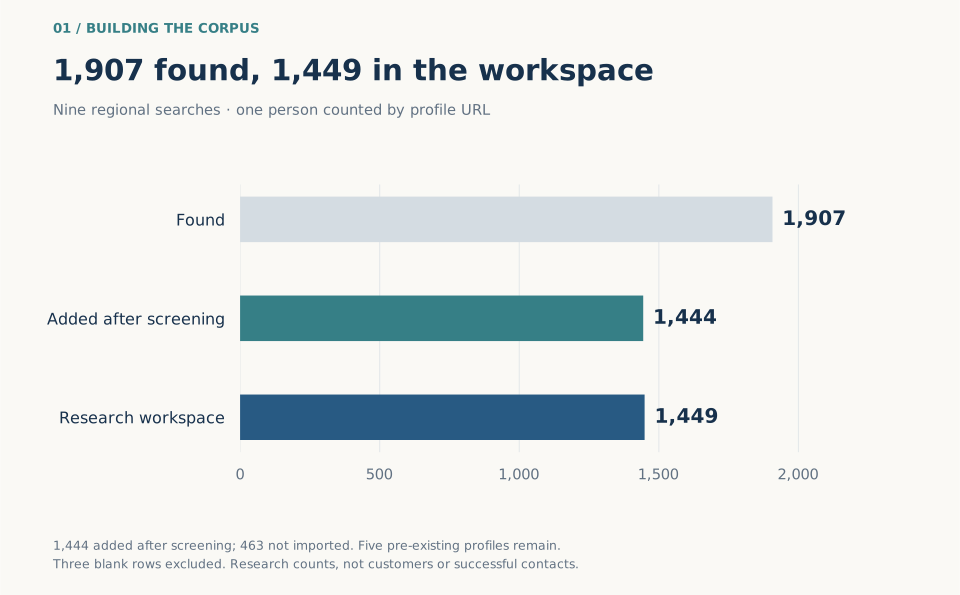
Nine regional keyword searches produced 1,907 distinct profile URLs. The recorded screening added 1,444 profiles with a relevant declared leadership, entrepreneurial or management role. Five existing profiles brought the research workspace to 1,449. The current Airtable count confirms that total; three blank rows are excluded.
- Distinct profiles found
- 1,907
- Profiles in the research workspace
- 1,449
- Regional keyword searches
- 9
- Profile cards in the separate Draft desk
- 174
Keep the evidence with the person
A TypeScript and Node harness works with an authenticated BrowserOS session. It extracts structured information from the observed page and keeps the profile URL, declared role, location, source context and research depth together. Ambiguous or unsupported interfaces return an explicit limitation.
Airtable holds the research records. A company inspection, a website observation and an agent’s interpretation have separate fields. This helps me distinguish something I saw from a possible conversation angle. A name match or a founder title alone does not establish a company identity, purchasing authority or a need for my work.
Research that stays connected to its sources
- Discover — Collect declared profile information and preserve its source.
- Qualify — Check the role, company context and depth of the available evidence.
- Organize — Keep activity signals, unresolved questions and next steps distinct.
- Prepare — Use that context for a draft I can review and edit.
Leave the unknowns visible
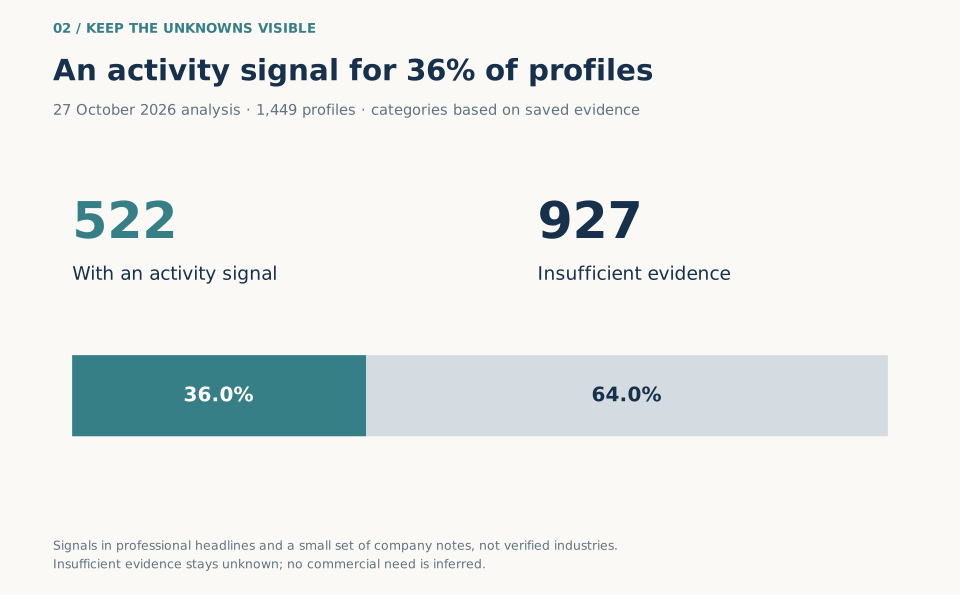
The activity map uses explicit French and English phrases in saved professional headlines, with a small set of overrides supported by recorded company notes. In the 27 October snapshot, 522 profiles carry an activity signal and 927 do not have enough evidence for one.
That 36% coverage is useful for choosing where to investigate next. It is not a confidence score or a verified industry classification. The same snapshot has 33 agent-review records, 16 company-inspection notes and 13 recorded websites. Those are different depths of evidence; an agent review can concern a search card rather than a fully inspected profile.
- Profiles with an agent-review record
- 33
- Profiles with a company-inspection note
- 16
- Profiles with a recorded website
- 13
Use the map to choose a useful question
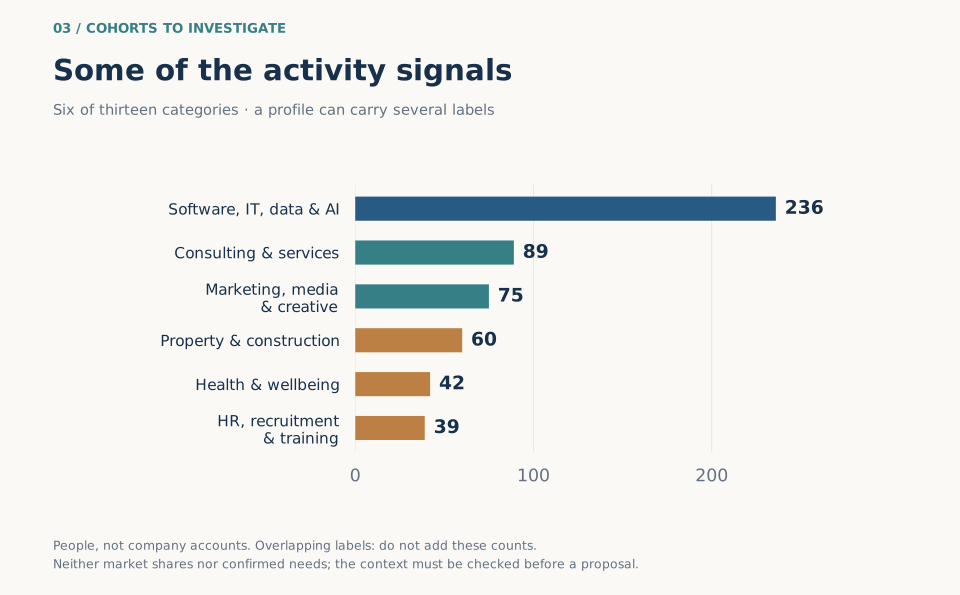
Software, services, creative work and operational businesses can suggest different conversations. I used the map to form small research cohorts, then look for the actual company, its offer and the context behind the profile before choosing an approach.
The labels overlap. Someone working on software for retailers can carry both software and commerce signals. A financial term can describe a person’s function or a customer market. The chart counts people with signals, not independent companies or confirmed demand.
One person, one shared draft
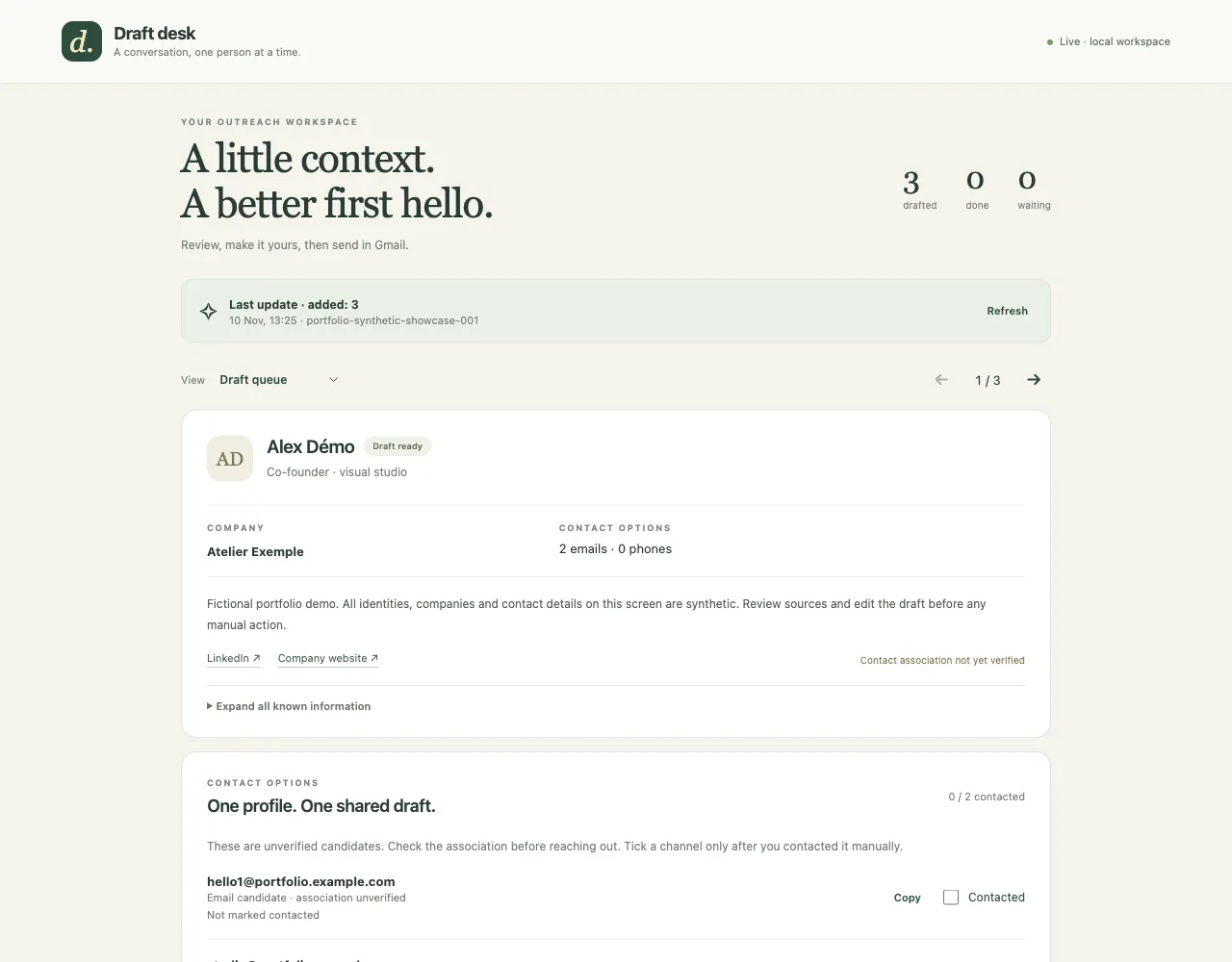
Draft desk turns the selected contact research into a local review queue. The current local state contains 174 profile cards and 677 candidate contact methods. That is a smaller workspace than the full research corpus, and the contact associations still need checking.
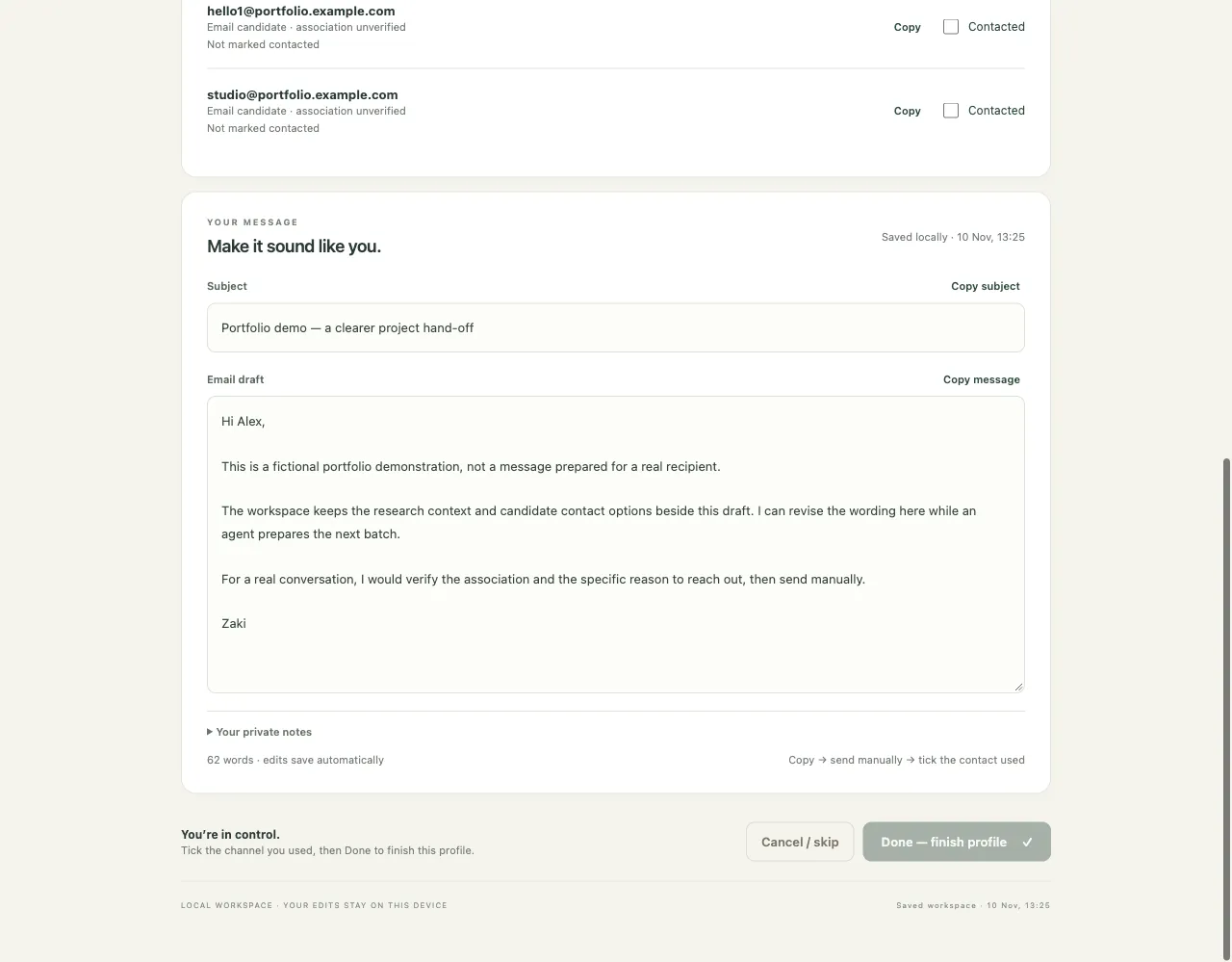
Records are grouped by canonical profile URL. One person has a shared subject and message, several possible contact channels and their own history. Names alone do not merge people, and a shared company inbox does not turn two profiles into one. I can inspect the source context, revise the wording and choose a channel.
From a draft to manual tracking
- Review & edit — Check the association and make the subject and body my own.
- Send manually — Copy the reviewed text into Gmail and decide whether to send it.
- Record the channel — Mark the specific contact method used, then finish or reopen the profile.
Keep working while an agent prepares the next batch
An agent can export eligible records and prepare a batch while I keep editing. New drafts append to the queue: the documented example moves a person at 3 / 10 to 3 / 15 without changing their position or draft. Revisions, human-edit flags and completed statuses prevent silent replacement.
A batch is validated as a whole. Reusing the same batch ID with the same content is safe; conflicting reuse or stale revisions are rejected. The local store uses atomic writes and process locks, with migration backups and browser edit recovery when a save fails.
Subject and body edits use a 600 ms autosave delay, and the UI checks for appended work every three seconds. Those are interface settings. The engineering goal is continuity: I can review one message without losing it when the next five arrive.
What the project gives me
The recorded Draft desk validation includes 38 Python checks and 59 JavaScript/TypeScript checks, with synthetic UI scenarios for queue continuity, edits, recovery and contact-level tracking. Those figures describe the existing validation record, not a new full test run for this portfolio.
The result is a workspace I can return to: research stays inspectable, drafts stay editable and each person keeps their own context. I have not established a measured reply rate, client-acquisition result or time-saving figure from these records. What I can show is the workflow and the decisions that make it usable.